xcore / mingl is moving along quite well.
Operating on a basic create / destroy paradigm, with bind/unbind as the activation mechanism and load as the data send mechanism, it works well for abstracting graphics hardware and allowing for faster creation of intense graphics applications.
Here's a nonsense screenshot:
This is a vector field represented as moving transparent spheres that are depth sorted. The vector field is generated by 3 functions modulated together.
The shading is generated via vertex and fragment program. The meshes are using a VBO/IBO abstraction paradigm.
All is well. More later.
Miscellaneous banter, Useful mathematics, game programming tools and the occasional kink or two.
Showing posts with label vertex program. Show all posts
2009-11-17
2009-03-24
More nonsense
So, working on more things, lots of things. 'Sys' is the new IGTL system namespace, which provides all the utilities that you could need for memory, data structures, file/directory IO, mathematics, 3D mathematics, algorithms, and all the basic stuf every system should have. Basically, it's a new version of cstdlib, that uses C++ stuff (like STL, but not junky) for some systems. Specially, it has a lot of very common math and algorithms in a very clean and not junky C-style system, so you don't have to freak out over overhead.
It's coming along awesome, and I love it. It makes so much more sense now, getting the base code out of the way. Although, it does prove that the C++ crap is near useless, which by extenstion makes most all languages that are not python a$$. And all other languages are useless for realtime stuff.
So, I also learned how to do 'Hemispherical Lighting', which is a simple little trick in your good ole shader math:
float dp = light_vector dot normal ;
float schemi = hemi_scale * pow( hemi_power, 0.5 * dp + 0.5 ); //Light factor to use
And, again in GL_fragment_shader_arb lingo,
DP3 temp2.x, nNorm, -mvp[2]; #Dot view normal (curr view) with vertex normal to get generic light intensity
#---Hemispherical lighting--- Req: K.y = 0.5, LK.z = light_pow, LK.w = light_scale
MAD temp2.y, temp2.x, LP.x, LP.y; #t = t*0.5 + 0.5 (hemispherical lighting = cool)
#---Scale the light to be the hemisphere
POW temp2.y, LP.z, temp2.y; #t = pow(t, hard), flip this to halo (A^B)
MUL temp2.y, temp2.y, LP.w; #t *= spec
#---Calculate final hemi diffuse color
MUL temp1, temp2.y, fragment.color; #Interpolate color to black (mult op)
And, some examples, but I don;t have comparison shots because Blender uses hemi lights, you can easily see the difference.
Hey, it's delgadosaur again, and it looks less plastic, more daylight plastic.
And a new member of the crew, this purple-dragon thing that's more friendly and low poly. But that's what textures and sub-surface models are for, right?
Anyways. Peace out.
-Z
It's coming along awesome, and I love it. It makes so much more sense now, getting the base code out of the way. Although, it does prove that the C++ crap is near useless, which by extenstion makes most all languages that are not python a$$. And all other languages are useless for realtime stuff.
So, I also learned how to do 'Hemispherical Lighting', which is a simple little trick in your good ole shader math:
float dp = light_vector dot normal ;
float schemi = hemi_scale * pow( hemi_power, 0.5 * dp + 0.5 ); //Light factor to use
And, again in GL_fragment_shader_arb lingo,
DP3 temp2.x, nNorm, -mvp[2]; #Dot view normal (curr view) with vertex normal to get generic light intensity
#---Hemispherical lighting--- Req: K.y = 0.5, LK.z = light_pow, LK.w = light_scale
MAD temp2.y, temp2.x, LP.x, LP.y; #t = t*0.5 + 0.5 (hemispherical lighting = cool)
#---Scale the light to be the hemisphere
POW temp2.y, LP.z, temp2.y; #t = pow(t, hard), flip this to halo (A^B)
MUL temp2.y, temp2.y, LP.w; #t *= spec
#---Calculate final hemi diffuse color
MUL temp1, temp2.y, fragment.color; #Interpolate color to black (mult op)
And, some examples, but I don;t have comparison shots because Blender uses hemi lights, you can easily see the difference.
Hey, it's delgadosaur again, and it looks less plastic, more daylight plastic.
And a new member of the crew, this purple-dragon thing that's more friendly and low poly. But that's what textures and sub-surface models are for, right?Anyways. Peace out.
-Z
Labels:
dragon,
fragment program,
GLSL,
lizard,
opengl,
SDL,
vertex program
2009-02-10
Thumbs Up!
Okay, I got it. Matrix Palette exporter works fine now.

Next up is adding in textures in MIF/QIF format (already done, copy paste job), and then deciding the structure for spread-optimized armature/matrix palette, and then keyframes using vertex duplicate's.
Of course, now that THIS works, it'll be time to shove it onto the iPhone. Imagine that, "Monster Game" for the iPhone! Course it'll be stripped down, but hey, sounds fun.
Peace ya'll!
-Z
Next up is adding in textures in MIF/QIF format (already done, copy paste job), and then deciding the structure for spread-optimized armature/matrix palette, and then keyframes using vertex duplicate's.
Of course, now that THIS works, it'll be time to shove it onto the iPhone. Imagine that, "Monster Game" for the iPhone! Course it'll be stripped down, but hey, sounds fun.
Peace ya'll!
-Z
Labels:
ARF,
BRF,
fragment program,
lizard,
opengl,
SDL,
shaders,
vertex program
2009-02-07
Well, goddamnit, GODDAMNIT! Again, again!
Well, still can't get it right. The materials have been fixed, apparently, but only for some models. Others still have trouble??? (Saurosaur model has some trouble when it's subsurfaced, but I believe this is related to the matrix problem at hand)
At least this picture is a little less boring

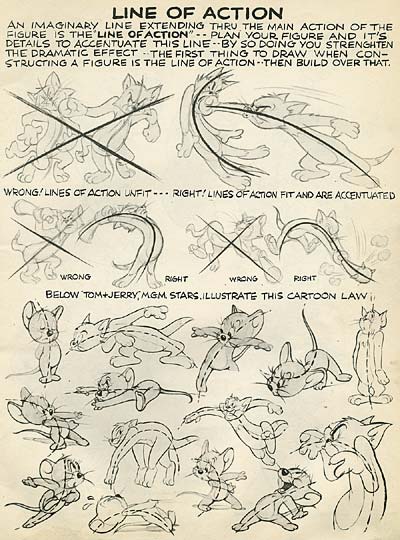
Also, I have a feeling some people don't know what spinal curves are. Actually, if you have studied animation, you might understand these as "Action Lines" or "Line of Action" or whatever name you want to give them. In fact, if you build your skeleton correctly, you can draw these spinal curves, and it shows you the model's action pose, from which it is WAY easier to tweak that action line than it is to screw with posing bones. I hope that Blender integrates this posing system into it's bones, it would only require an additional flag and some simple bone-blending editing tricks. It's very helpful for bringing things to life. What good is this realtime though? It's helpful if you don't have shaders on your PC, so you can at least see the game sort of. It's also helpful for special effects, and some other 'interesting' deformations... he he.

I still need help with the exporter. It's not to my QC standards yet.
-Z
At least this picture is a little less boring

Also, I have a feeling some people don't know what spinal curves are. Actually, if you have studied animation, you might understand these as "Action Lines" or "Line of Action" or whatever name you want to give them. In fact, if you build your skeleton correctly, you can draw these spinal curves, and it shows you the model's action pose, from which it is WAY easier to tweak that action line than it is to screw with posing bones. I hope that Blender integrates this posing system into it's bones, it would only require an additional flag and some simple bone-blending editing tricks. It's very helpful for bringing things to life. What good is this realtime though? It's helpful if you don't have shaders on your PC, so you can at least see the game sort of. It's also helpful for special effects, and some other 'interesting' deformations... he he.

I still need help with the exporter. It's not to my QC standards yet.
-Z
Labels:
blender,
BRF,
fragment program,
lizard,
opengl,
SDL,
vertex program
2009-02-04
Well, goddamnit again!
Still fighting. Hang in there, plastic lizard monster!
And yes, you will be fighting against this mo'fo, but as you can see, there are still glitches in the code. I am still lost as to where, it seems that larger models export better (how crazy is that?!) and they work fantastically well, as you can see.
What is wrong:
Materials are not perfect, there are 1 spots on this model that have incorrect materials
Not all deformation groups are correct, you can see the spike present. On lower res models, it's way uglier.
I need help.
-Z
And yes, you will be fighting against this mo'fo, but as you can see, there are still glitches in the code. I am still lost as to where, it seems that larger models export better (how crazy is that?!) and they work fantastically well, as you can see.What is wrong:
Materials are not perfect, there are 1 spots on this model that have incorrect materials
Not all deformation groups are correct, you can see the spike present. On lower res models, it's way uglier.
I need help.
-Z
Labels:
fragment program,
lizard,
opengl,
SDL,
vertex program
2009-02-03
Well, goddamnit!
Well. I still am having a hell of a time getting my GRF exporter to cooperate.
For some reason, it works fine for models with less than 24 bones. However, models that have more than that (all of mine do) it screws up something with the vertex data, or maybe the bones, because suddenly, and irrationally, the bone groups dissociate and the neck will move when you bend the tail.
I'm at a loss here, as I've checked the algorithms a hundred times, checked and verified the DATA ITSELF, so that I know that the bones are correct, faces, everything is correct... checked the C++ code, which reads it EXACTLY as the file, so I know the C code works since it is general case... so, where is the error?
My guess is it lies inside of python somewhere.
Maybe a stupid screenshot will cheer me up:
Whoopee... old school poser models. yay.
Also, I have the fragment program and vertex program working fine. Tested, verified, fun to play with and easy to work with. I'll be much happier when I can GLSL this mess, although these programs are just about as fast as it can get, so not much reason to yet.
Blender is cooperating fine, I've had no problems from it, aside from this list of annoyances:
1. No bone weight keyframes available, I need to be able to save weights in vertex groups as a keyframe
2. No UV keyframes available, I need to be able to save UV layer keyframes
3. Actions are not tied to anything, and they are still difficult to use for making a movie, most people just use the 'one large action' to do it. Make actions work like actions, not scene animations. Make the NLA mean something, dammit.
4. No support for mesh keyframe animations that makes sense. Why can't I just IPO a list of keyframes, instead of making 1 ipo for each keyframe (which is hell without a script, by the way)
5. More materials. I need more than 16 materials. try 127? or 255?
6. Much improved curve support. I should be able to hook curve verticies ONTO anything, like armatures and objects and verticies, without having to use the vertex hook <-> empty <-> curve thing.
and so on.
Hopefully I can get this $@#*( problem solved. This isn't a specialized problem, it's general, so it works for any matrix-palette system, including the coveted iPhone, PS3, and the PC.
Peace folks,
-Z
For some reason, it works fine for models with less than 24 bones. However, models that have more than that (all of mine do) it screws up something with the vertex data, or maybe the bones, because suddenly, and irrationally, the bone groups dissociate and the neck will move when you bend the tail.
I'm at a loss here, as I've checked the algorithms a hundred times, checked and verified the DATA ITSELF, so that I know that the bones are correct, faces, everything is correct... checked the C++ code, which reads it EXACTLY as the file, so I know the C code works since it is general case... so, where is the error?
My guess is it lies inside of python somewhere.
Maybe a stupid screenshot will cheer me up:
Whoopee... old school poser models. yay.Also, I have the fragment program and vertex program working fine. Tested, verified, fun to play with and easy to work with. I'll be much happier when I can GLSL this mess, although these programs are just about as fast as it can get, so not much reason to yet.
Blender is cooperating fine, I've had no problems from it, aside from this list of annoyances:
1. No bone weight keyframes available, I need to be able to save weights in vertex groups as a keyframe
2. No UV keyframes available, I need to be able to save UV layer keyframes
3. Actions are not tied to anything, and they are still difficult to use for making a movie, most people just use the 'one large action' to do it. Make actions work like actions, not scene animations. Make the NLA mean something, dammit.
4. No support for mesh keyframe animations that makes sense. Why can't I just IPO a list of keyframes, instead of making 1 ipo for each keyframe (which is hell without a script, by the way)
5. More materials. I need more than 16 materials. try 127? or 255?
6. Much improved curve support. I should be able to hook curve verticies ONTO anything, like armatures and objects and verticies, without having to use the vertex hook <-> empty <-> curve thing.
and so on.
Hopefully I can get this $@#*( problem solved. This isn't a specialized problem, it's general, so it works for any matrix-palette system, including the coveted iPhone, PS3, and the PC.
Peace folks,
-Z
Labels:
blender,
dragon,
fragment program,
opengl,
SDL,
vertex program
2009-01-18
GL_ARB_vertex_program II
I toyed with it a bit after rock banding it out with "Curetis Siva", the hottest new group to hit the pretend rock band scene.
More results:
This is 35 x Delgadosaurus's, which, he consists of 3700 verticies and 3800 polygons apiece.

Now, like the Asty demo, here's some frightening numbers:
129,500 fully deformed verticies ( 4 x weighted matrix deform + texture + lighting + cell shading) runs at 50 FPS, but only 13 IFPS. Note that the asty demo only had ~30000 verticies, so comparing the 17 / 13 ratio, you can see how linear the addition of verticies is to the GPU load.
Also, the collision in this one is taken out (VA/VBO's only) from this screenshot, yet the CPU load remained high, which is something to investigate. It must have to do with the bus transfer rates from system ram to GPU.
Point is, this kinda opens up the floor for high-poly models, which are nessecary for decent looking games (take a screenshot of Oblivion, it pushes at least 80,000 polygons per frame, all with multiple textures AND a fragment program)
But I care about animations more than textures, at least till I get my artists trained.
More technical notes:
since you have to break up verticies into groups for deformations, each vertex can only be deformed by a set maximum number of bones (4, in this case). You only have 28 bones to play with in the shader, however, if you want anything cool in your shader as well, you are knocked down to about 24 bones maximum. This might be a more useful practical limit anyhow. Storage cost is linear with each matrix used to deform, technically, there is no bone maximum limit, however, imposing one helps alignment constraints. In the ARB shaders, you can have a maximum of 128 instructions (excluding empty lines and comments), so your shaders have to be designed carefully. Only 96 local and 96 environment parameters are allowed in the shaders. Only 12 temporary values are allowed. A infinite number of ALIAS commands are allowed and they do not count against the instruction count (pretend they are #define statements). Loading shaders should be minimized. Switiching shaders should be minimized.
Things to determine:
Does using 4x matrix deform cost less than switching shaders?
Does updating params cost anything signifigant? (think per armature)
How viable is vertex keyframing? (per vertex, you have to load per keyframe switch per model)
How viable is Armature Relative Vertex Keyframes? (weight/offset positions)
Does the iPhone let me use n matricies? How slow is it's matrix palette?
Peace out till next time.
-Z
More results:
This is 35 x Delgadosaurus's, which, he consists of 3700 verticies and 3800 polygons apiece.

Now, like the Asty demo, here's some frightening numbers:
129,500 fully deformed verticies ( 4 x weighted matrix deform + texture + lighting + cell shading) runs at 50 FPS, but only 13 IFPS. Note that the asty demo only had ~30000 verticies, so comparing the 17 / 13 ratio, you can see how linear the addition of verticies is to the GPU load.
Also, the collision in this one is taken out (VA/VBO's only) from this screenshot, yet the CPU load remained high, which is something to investigate. It must have to do with the bus transfer rates from system ram to GPU.
Point is, this kinda opens up the floor for high-poly models, which are nessecary for decent looking games (take a screenshot of Oblivion, it pushes at least 80,000 polygons per frame, all with multiple textures AND a fragment program)
But I care about animations more than textures, at least till I get my artists trained.
More technical notes:
since you have to break up verticies into groups for deformations, each vertex can only be deformed by a set maximum number of bones (4, in this case). You only have 28 bones to play with in the shader, however, if you want anything cool in your shader as well, you are knocked down to about 24 bones maximum. This might be a more useful practical limit anyhow. Storage cost is linear with each matrix used to deform, technically, there is no bone maximum limit, however, imposing one helps alignment constraints. In the ARB shaders, you can have a maximum of 128 instructions (excluding empty lines and comments), so your shaders have to be designed carefully. Only 96 local and 96 environment parameters are allowed in the shaders. Only 12 temporary values are allowed. A infinite number of ALIAS commands are allowed and they do not count against the instruction count (pretend they are #define statements). Loading shaders should be minimized. Switiching shaders should be minimized.
Things to determine:
Does using 4x matrix deform cost less than switching shaders?
Does updating params cost anything signifigant? (think per armature)
How viable is vertex keyframing? (per vertex, you have to load per keyframe switch per model)
How viable is Armature Relative Vertex Keyframes? (weight/offset positions)
Does the iPhone let me use n matricies? How slow is it's matrix palette?
Peace out till next time.
-Z
Labels:
Curetis Siva,
lizard,
opengl,
SDL,
vertex program
2009-01-17
GL_ARB_vertex_program
As the title states, I've been hardcoring this useful tool in order to combat the 'Dancing Lizards' demo performance ratio of 98% CPU / 16 lizards. Now,
We have 35 x Asty's (Asty is just another fat lizard monster, with 800 verts and 1200 poly count. The original dancing lizard was 300 verts with 400 polys.).
The crazy note is, this is a 10% CPU / 35 fully animated characters, including cell shading, deformers, AND whatever else the hell I want to do. This is plenty of performance.
However, if you actually look at this ugly screenshot, you'll notice the statistics in the upper left seem to contradict me; be patient, the IFPS is what is important (~16) which are how many inter-frames there are (1 ms) between render frames. Since all my apps are capped to exactly 50 FPS internal, this means there are 16 ms in there that the game can run and poll for whatever, which is what it does.
Now for some nitty gritty. Let's say you have Asty as a creature in your game (he's quite a friendly fellow!) and you want to make him all sorts of animated, and you overkill the bone count (most of my models have ~120 or so bones, including fingers and IK stuff). Sadly, in the shader model, you cannot feasibly have more than ~28 bones in your shader program at once. (96 parameters available max) This means you have to preprocess groups of verticies that share bones (4 x shader counts, 1 for 1 matrix, 1 for 2 matrix, ect...) so you can actually do all the deformations. This means switching shader programs, which is costly. So, if you want a bunch of fodder enemies, you'll be needing to create some interesting optimization schemes to lower the bone count so you can avoid switching.
In this screenshot, each monster has every vertex with a GLubyte[4] for matrix local palette index (0 to 96, divide by 3) and GLfloat[4] for the weight. I intend to normalize this weight value so I can use bytes, as you generally don't need that accurate of a weigth float. Also, each vertex is renormalized so I can calculate the nifty cell shading value (sum normal dot eye normal = tex coord 0).
Let's look at some assembly:
PARAM K = {1, 0.5, 0, 3.141525968 };
#Skin with any affine matrix:
#PARAM Matrices[] = { program.local[12..84] } <= 28 matricies # [ Xx, Yx, Zx, x pos(1) ] # [ Xy, Yy, Zy, y pos(1) ] #Multiply each axis by it's scale to use scaling, but this will require renormalization for normals. # [ Xz, Yz, Zz, z pos(1) ] #This matrix is CPU computed from: # Let B be the current bone matrix (local to mesh, current pose) # Let M be the original bone matrix (local to mesh, default pose) # Then, W = (B * M^-1) # Send W to shader as matrix in correct form as above #Per vertex in a matrix deformed mesh, # vertex.attrib[6] store n indicies as unsigned bytes (n*1 bytes) # vertex.attrib[7] store n weights as floats (n*4 bytes) #? can we use byte weights? #Requires: RF, R, aMN; ( RF = sum, R = temp, addr = address ) ALIAS R = temp1; #Temp vector ALIAS RF = temp2; #Vector sum (always set to first matrix deform) ALIAS RFN = temp3; #Normal sum (always set to first matrix deform) #For matrix 1 (x)## ARL addr.x, vertex.attrib[6].x; #Get matrix array index DP4 R.x, Matrices[addr.x + 0], wPos; #Rotate & scale local vector (model position) DP4 R.y, Matrices[addr.x + 1], wPos; DP4 R.z, Matrices[addr.x + 2], wPos; MUL RF, R, vertex.attrib[7].x; #Multiply vector by weight, add to summated deformation vector DP3 R.x, Matrices[addr.x + 0], wNorm; #Rotate normal as needed (don't forget about scale...) DP3 R.y, Matrices[addr.x + 1], wNorm; DP3 R.z, Matrices[addr.x + 2], wNorm; MUL RFN, R, vertex.attrib[7].x; #Sum normal with weight as well ################## #For matrix 2 (y)## ARL addr.x, vertex.attrib[6].y; #Get matrix array index DP4 R.x, Matrices[addr.x + 0], wPos; #Rotate & scale local vector (model position) DP4 R.y, Matrices[addr.x + 1], wPos; DP4 R.z, Matrices[addr.x + 2], wPos; MAD RF, R, vertex.attrib[7].y, RF; #Multiply vector by weight, add to summated deformation vector DP3 R.x, Matrices[addr.x + 0], wNorm; #Rotate normal as needed DP3 R.y, Matrices[addr.x + 1], wNorm; DP3 R.z, Matrices[addr.x + 2], wNorm; MAD RFN, R, vertex.attrib[7].y, RFN; #Sum normal with weight as well ################## #For matrix 3 (z)## ARL addr.x, vertex.attrib[6].z; #Get matrix array index DP4 R.x, Matrices[addr.x + 0], wPos; #Rotate & scale local vector (model position) DP4 R.y, Matrices[addr.x + 1], wPos; DP4 R.z, Matrices[addr.x + 2], wPos; MAD RF, R, vertex.attrib[7].z, RF; #Multiply vector by weight, add to summated deformation vector DP3 R.x, Matrices[addr.x + 0], wNorm; #Rotate normal as needed DP3 R.y, Matrices[addr.x + 1], wNorm; DP3 R.z, Matrices[addr.x + 2], wNorm; MAD RFN, R, vertex.attrib[7].z, RFN; #Sum normal with weight as well ################## #For matrix 4 (w)## ARL addr.x, vertex.attrib[6].w; #Get matrix array index DP4 R.x, Matrices[addr.x + 0], wPos; #Rotate & scale local vector (model position) DP4 R.y, Matrices[addr.x + 1], wPos; DP4 R.z, Matrices[addr.x + 2], wPos; MAD RF, R, vertex.attrib[7].w, RF; #Multiply vector by weight, add to summated deformation vector DP3 R.x, Matrices[addr.x + 0], wNorm; #Rotate normal as needed DP3 R.y, Matrices[addr.x + 1], wNorm; DP3 R.z, Matrices[addr.x + 2], wNorm; MAD RFN, R, vertex.attrib[7].w, RFN; #Sum normal with weight as well ################### MOV wNorm, RFN; #Set final normal DP3 R, wNorm, wNorm; #Renormalize normal after deformations (extremely iffy) RSQ R, R.x; MUL wNorm, wNorm, R; MOV wPos.xyz, RF; #Set final position of deformation (could use non-normal weights too...) And that's all you need to make a skinned model in OpenGL using the common ARG vertex program extension. Naturally, people are idiots, and will ask 'why do this instead of GLSL?' and 'This is too old to be useful'. Obviously, if you can do it using the card's assembly language, it's a cinch to move to higher level languages. In fact, it's a incredibly good excercise in understanding not only SIMD instruction stuff, but also general matrix/vector processing units. Plus, this is damned fast and way more portable than GLSL. As some side notes, I have a lot of other nifty shader code, specifically for this things I find important, like: Normal Map colors Cast deformations (spherical) Push-Cast deformations (point -> sphere outward from point)
Water/Perlin noise wobbling
Texture-coordinate lighting
Multiple light cheats
More shading and lighting models
More to come once I give Asty a soul using my IK algorithms and rig him up proper with lotsa delicious bones. THEN we'll see how much CPU we get, and who knows, maybe we'll even get a game demo where you can SSBM other Asty's.
*Note, I also forgot this demo tests a sphere-triangle collision with EVERY loaded triangle. Thus, fixing that, the CPU usage was at MOST 1% for 25 Asty's. So hah. I can't wait to have 1000 lizards dancing. Eat it, GEICO!
-Z
We have 35 x Asty's (Asty is just another fat lizard monster, with 800 verts and 1200 poly count. The original dancing lizard was 300 verts with 400 polys.).The crazy note is, this is a 10% CPU / 35 fully animated characters, including cell shading, deformers, AND whatever else the hell I want to do. This is plenty of performance.
However, if you actually look at this ugly screenshot, you'll notice the statistics in the upper left seem to contradict me; be patient, the IFPS is what is important (~16) which are how many inter-frames there are (1 ms) between render frames. Since all my apps are capped to exactly 50 FPS internal, this means there are 16 ms in there that the game can run and poll for whatever, which is what it does.
Now for some nitty gritty. Let's say you have Asty as a creature in your game (he's quite a friendly fellow!) and you want to make him all sorts of animated, and you overkill the bone count (most of my models have ~120 or so bones, including fingers and IK stuff). Sadly, in the shader model, you cannot feasibly have more than ~28 bones in your shader program at once. (96 parameters available max) This means you have to preprocess groups of verticies that share bones (4 x shader counts, 1 for 1 matrix, 1 for 2 matrix, ect...) so you can actually do all the deformations. This means switching shader programs, which is costly. So, if you want a bunch of fodder enemies, you'll be needing to create some interesting optimization schemes to lower the bone count so you can avoid switching.
In this screenshot, each monster has every vertex with a GLubyte[4] for matrix local palette index (0 to 96, divide by 3) and GLfloat[4] for the weight. I intend to normalize this weight value so I can use bytes, as you generally don't need that accurate of a weigth float. Also, each vertex is renormalized so I can calculate the nifty cell shading value (sum normal dot eye normal = tex coord 0).
Let's look at some assembly:
PARAM K = {1, 0.5, 0, 3.141525968 };
#Skin with any affine matrix:
#PARAM Matrices[] = { program.local[12..84] } <= 28 matricies # [ Xx, Yx, Zx, x pos(1) ] # [ Xy, Yy, Zy, y pos(1) ] #Multiply each axis by it's scale to use scaling, but this will require renormalization for normals. # [ Xz, Yz, Zz, z pos(1) ] #This matrix is CPU computed from: # Let B be the current bone matrix (local to mesh, current pose) # Let M be the original bone matrix (local to mesh, default pose) # Then, W = (B * M^-1) # Send W to shader as matrix in correct form as above #Per vertex in a matrix deformed mesh, # vertex.attrib[6] store n indicies as unsigned bytes (n*1 bytes) # vertex.attrib[7] store n weights as floats (n*4 bytes) #? can we use byte weights? #Requires: RF, R, aMN; ( RF = sum, R = temp, addr = address ) ALIAS R = temp1; #Temp vector ALIAS RF = temp2; #Vector sum (always set to first matrix deform) ALIAS RFN = temp3; #Normal sum (always set to first matrix deform) #For matrix 1 (x)## ARL addr.x, vertex.attrib[6].x; #Get matrix array index DP4 R.x, Matrices[addr.x + 0], wPos; #Rotate & scale local vector (model position) DP4 R.y, Matrices[addr.x + 1], wPos; DP4 R.z, Matrices[addr.x + 2], wPos; MUL RF, R, vertex.attrib[7].x; #Multiply vector by weight, add to summated deformation vector DP3 R.x, Matrices[addr.x + 0], wNorm; #Rotate normal as needed (don't forget about scale...) DP3 R.y, Matrices[addr.x + 1], wNorm; DP3 R.z, Matrices[addr.x + 2], wNorm; MUL RFN, R, vertex.attrib[7].x; #Sum normal with weight as well ################## #For matrix 2 (y)## ARL addr.x, vertex.attrib[6].y; #Get matrix array index DP4 R.x, Matrices[addr.x + 0], wPos; #Rotate & scale local vector (model position) DP4 R.y, Matrices[addr.x + 1], wPos; DP4 R.z, Matrices[addr.x + 2], wPos; MAD RF, R, vertex.attrib[7].y, RF; #Multiply vector by weight, add to summated deformation vector DP3 R.x, Matrices[addr.x + 0], wNorm; #Rotate normal as needed DP3 R.y, Matrices[addr.x + 1], wNorm; DP3 R.z, Matrices[addr.x + 2], wNorm; MAD RFN, R, vertex.attrib[7].y, RFN; #Sum normal with weight as well ################## #For matrix 3 (z)## ARL addr.x, vertex.attrib[6].z; #Get matrix array index DP4 R.x, Matrices[addr.x + 0], wPos; #Rotate & scale local vector (model position) DP4 R.y, Matrices[addr.x + 1], wPos; DP4 R.z, Matrices[addr.x + 2], wPos; MAD RF, R, vertex.attrib[7].z, RF; #Multiply vector by weight, add to summated deformation vector DP3 R.x, Matrices[addr.x + 0], wNorm; #Rotate normal as needed DP3 R.y, Matrices[addr.x + 1], wNorm; DP3 R.z, Matrices[addr.x + 2], wNorm; MAD RFN, R, vertex.attrib[7].z, RFN; #Sum normal with weight as well ################## #For matrix 4 (w)## ARL addr.x, vertex.attrib[6].w; #Get matrix array index DP4 R.x, Matrices[addr.x + 0], wPos; #Rotate & scale local vector (model position) DP4 R.y, Matrices[addr.x + 1], wPos; DP4 R.z, Matrices[addr.x + 2], wPos; MAD RF, R, vertex.attrib[7].w, RF; #Multiply vector by weight, add to summated deformation vector DP3 R.x, Matrices[addr.x + 0], wNorm; #Rotate normal as needed DP3 R.y, Matrices[addr.x + 1], wNorm; DP3 R.z, Matrices[addr.x + 2], wNorm; MAD RFN, R, vertex.attrib[7].w, RFN; #Sum normal with weight as well ################### MOV wNorm, RFN; #Set final normal DP3 R, wNorm, wNorm; #Renormalize normal after deformations (extremely iffy) RSQ R, R.x; MUL wNorm, wNorm, R; MOV wPos.xyz, RF; #Set final position of deformation (could use non-normal weights too...) And that's all you need to make a skinned model in OpenGL using the common ARG vertex program extension. Naturally, people are idiots, and will ask 'why do this instead of GLSL?' and 'This is too old to be useful'. Obviously, if you can do it using the card's assembly language, it's a cinch to move to higher level languages. In fact, it's a incredibly good excercise in understanding not only SIMD instruction stuff, but also general matrix/vector processing units. Plus, this is damned fast and way more portable than GLSL. As some side notes, I have a lot of other nifty shader code, specifically for this things I find important, like: Normal Map colors Cast deformations (spherical) Push-Cast deformations (point -> sphere outward from point)
Water/Perlin noise wobbling
Texture-coordinate lighting
Multiple light cheats
More shading and lighting models
More to come once I give Asty a soul using my IK algorithms and rig him up proper with lotsa delicious bones. THEN we'll see how much CPU we get, and who knows, maybe we'll even get a game demo where you can SSBM other Asty's.
*Note, I also forgot this demo tests a sphere-triangle collision with EVERY loaded triangle. Thus, fixing that, the CPU usage was at MOST 1% for 25 Asty's. So hah. I can't wait to have 1000 lizards dancing. Eat it, GEICO!
-Z
Subscribe to:
Posts (Atom)