2009-11-21

mingl - depth sorting order

Depth sorting is a traditional fix for a variety of problems;

However, it is a unsolvable problem. Consider that you have two long triangles, and you point the camera down the longest side of each. The triangles overlap; So if you draw one before the other, one triangle will depth clip the other, resulting in incorrect blending. The traditional fix is to draw with depth writing disabled, and then draw with color writing disabled. This can fix that special case, but causes other problems like highlights and odd depth clippings.

As a direct result, you generally need to draw all opaque objects first; Then perform the above method, which should correctly render the transparent polygons. however, as it may be obvious, you need a specialized structure to deal with being able to partition and sort your meshes by transparency.

This problem is not related to alpha clipping or depth fragment alpha, which is the problem of a semitransparent object occluding other geometry. In practice, it does well to solve this issue though.

Here is the difference between depth sorting and non depth sorting your objects; Notice there are still some errors, but the effect is minimal:


This effect is largely a matter of taste; And mingl is not responsible for how you draw, only for abstracting the graphics rendering hardware.

In a unrelated event; Any of you that know the Atari 2600 game "Adventure"? Well, you had better know about this hilarity: Adventure 2600 Reboot

Sound familiar? 

Yeah. But it's not like my version; and after playing  their version, I think I can one up this, so I'll try and make a "Adventure Remix" using my mingl / xcore system. The benefits, are it is something I like to make, as well as something people can probably enjoy messing with for a little bit. I'm just drawing and modeling, but I do not plan to clone or copy the game, instead I want to recreate the spirit of the game, and add my own little improvements. Plus, with my new toon hemi shader, it can look all sorts of shiny.

Til' later;

-Z

2009-11-17

mingl - progress updates

xcore / mingl is moving along quite well.

Operating on a basic create / destroy paradigm, with bind/unbind as the activation mechanism and load as the data send mechanism, it works well for abstracting graphics hardware and allowing for faster creation of intense graphics applications.

Here's a nonsense screenshot:


This is a vector field represented as moving transparent spheres that are depth sorted. The vector field is generated by 3 functions modulated together.

The shading is generated via vertex and fragment program. The meshes are using a VBO/IBO abstraction paradigm.

All is well. More later.

2009-11-06

DXT Texture compression

DXT image compression (also S3TC) allows you to save:

DXT1_RGB -> 1:8  RGB 565 4 level only
DXT1_RGBA -> 1:8  RGB 565 4 level and 1 bit alpha channel
DXT5_RGBA -> 1:4  RGB 565 4 level and 7 level alpha channel

As a result, for certain textures DXT can be used to compress images with reasonable loss of clarity.


Most importantly, within the DXT5 compression scheme, you still have 4x4 texel blocks interpolating between two color values. These color values are RGB565 (5 bits of red, 6 bits of gree, 5 bits of blue) and thus the green channel can be more precise. Also, the alpha channel has all 8 bits, but interpolates between 7 alpha values per texel. As a result, you can use DXT5 to store compressed normal maps by storing the x component in the green channel, and the y value in the alpha component. Then, in the shader, you can calculate the missing z value from assuming your normal map was actually normalized (x^2 + y^2 + z^2 = 1).

More updates later.
Z out.

2009-11-05

Cube Sphere

The Naiive implementation of making a Cube a Sphere is to make a cube, then select all verticies and "Mesh -> Transform -> To Sphere". This results in severe distortion along the principal axes, and a poor approximation of a sphere, as a result.

A more correct implementation is to notice that this is analogous to taking two planes centered at the origin, and rotating them n time in discrete angular intervals, thus chopping space into uniform areas, resulting in far less distortion.

Neither approach is perfect because you cannot comb a hairy sphere smooth. But the Cube Sphere is far superior, and easier to generate using a difference equation.


Cube Spheres are good for working with planets and large scale data, but don't have many other uses besides easier texturing of spheres.

..I can;t seem to figure out how to post data to blogger... how to post a .py script?

It's not 100% perfect; copy paste into notepad or something

Here goes nothin':

#!BPY
"""
Name: 'CubeSphere'
Blender: 249
Group: 'AddMesh'
Tooltip: 'Creates a Cube Map sphere'
"""
__author__ = "Izcalli64"
__url__ = ("blender", "http://imaginaryz.blogspot.com");
__version__ = "0.0 2009-11-05"

import Blender
import math;

def generate_grid( ndiv, spanning ):

    #
    #Optimal spanning value: Unknown
    #Optimal spanning equation: Unknown
    #

    radius = 1.0;    #Fixed; don't vary this.
    points = [];
    ndiv = int( ndiv );
   
    #From experiment; It looks like you need a transformation from radial space to manhatten space:
    #
    #the only fixed points are the 4 corner points, from which there are lateral and vertical lines;
    #These lines must have points distributed on them evenly, by angle.
    #These lines are NOT consistent, but do consist of great circle arcs.
    #
    #SOLUTION:
    #
    #Generate a cube sphere by taking 2 lists of evenly distributed angles;
    #Generate the great circle planes (planes) that intersect the angles;
    #Calculate all points on the grid that are the intersections of both:
    #    The sphere of radius R
    #    Great circles A and B (will always form a line, no matter what.
    #The result:
    #    Quite a substantial amount less error than the other method. (see .blend)
    #The problem:
    #    Hard to optimize
    #
    dtr = math.pi/180.0;
    mina = 45.0 * dtr;    #Minimum angle (45 = pi/4)
    maxa = 135.0 * dtr;    #Maximum angle (135 = 3*pi/4)
    rangea = maxa - mina;
    dela = (maxa - mina)/float(ndiv-1);
    spanrange = dela * spanning;

    #Generate strip angles (for consistency)
    stripa = [];
   
    stripa.append( [ mina, math.sin(mina), math.cos(mina) ] );
    idex = 1;
    ia = mina + dela;
    while( idex < (ndiv-1) ):

        #Default angles (angular evenness)
        #stripa.append( [ ia, math.sin(ia), math.cos(ia) ] );

        #Corrected angles:
        delv = 2.0 * ((float(idex)/float(ndiv-1)) - 0.5);    #-1.0..1.0 range
        dels = 0;
        if( delv < 0 ):
            dels = -1.0;
        elif( delv > 0 ):
            dels = 1.0;       
           
        #Correction quadratic equation (B-spline could be more effective)
        #ian = dels * (delv*delv) * spanrange + ia;
        #ian = -dels * (1.0 - (delv*delv)) * spanrange + ia;
        ian = -dels * (1.0 - abs(delv)) * spanrange + ia;#Very simple; linear. Problem is not linear.


        #print delv, dels, -dels * (1.0 - (delv*delv));
       
        stripa.append( [ ian, math.sin(ian), math.cos(ian) ] );

        ia += dela;
        idex += 1;
    stripa.append( [ maxa, math.sin(maxa), math.cos(maxa) ] );
   
    for ex in stripa:
        print ex;
   
    #Generate strips:
    iy = 0;
    while( iy < ndiv ):
        ix = 0;
        while( ix < ndiv ):
       
            #Plane X / Circle X
            PXx = stripa[ix][2];    #cos(x)
            PXy = stripa[ix][1];    #sin(x)
            PXz = 0;
           
            #Plane Y / Circle Y
            PYx = stripa[iy][2];    #cos(y)
            PYy = 0;
            PYz = stripa[iy][1];    #sin(y)
           
            #Cross product (direction vector to use; can be optimized:)
            #nx = PXy * PYz - PXz * PYy;
            #ny = PXz * PYx - PXx * PYz;
            #nz = PXx * PYy - PXy * PYx;
            nx =   PXy * PYz;
            ny = - PXx * PYz;    #Optimized cross product from zero factors
            nz = - PXy * PYx;
           
            #Normalize direction vector
            nm = math.sqrt( nx*nx + ny*ny + nz*nz );
            nx /= nm;
            ny /= nm;
            nz /= nm;

            #Apply scaling of shape
            tx = radius * nx;
            ty = radius * ny;
            tz = radius * nz;

            points.append( [tx,ty,tz] );
           
            ix += 1;
        iy += 1;
       
    return points;
   
def generate_points_swizzle( points, comp0, comp1, comp2, neg0, neg1, neg2 ):

    newpoints = [];
   
    sw0 = comp0;
    sw1 = comp1;
    sw2 = comp2;
   
    for P in points:
   
        np = [0,0,0];#[ P[sw0], P[sw1], P[sw2] ];
        if( neg0 != 0 ):
            np[0] = -P[sw0];
        else:
            np[0] = P[sw0];
           
        if( neg1 != 0 ):
            np[1] = -P[sw1];
        else:
            np[1] = P[sw1];
           
        if( neg2 != 0 ):
            np[2] = -P[sw2];
        else:
            np[2] = P[sw2];
        newpoints.append( np );
       
    return newpoints;
   
def generate_grid_uv( xdiv, ydiv ):

    uvs = [];
    iy = 0;
    while( iy < (ydiv) ):
        ix = 0;
        while( ix < (xdiv) ):

            u0 = float( ix ) / float(xdiv-1);
            v0 = float( iy ) / float(ydiv-1);
           
            uvs.append( [u0,v0] );

            ix += 1;
        iy += 1;
       
    return uvs;

def generate_grid_facelist( xdiv, ydiv, offset_index ):

    faces = [];

    iy = 0;
    while( iy < (ydiv-1) ):
        ix = 0;
        while( ix < (xdiv-1) ):

            fxy00 = int(offset_index + ix + (iy * xdiv));
            fxy10 = int(offset_index + ix + 1 + (iy * xdiv));
            fxy01 = int(offset_index + ix + ((iy + 1) * xdiv));
            fxy11 = int(offset_index + ix + 1 + ((iy + 1) * xdiv));
       
            faces.append( [fxy00,fxy10,fxy11,fxy01] );

            ix += 1;
        iy += 1;
       
    return faces;

def generate_cubesphere( in_radius, in_divisions, in_evenness ):

    #Generate each cube face, simply rotate it's data to match what we want.
    ndiv = in_divisions + 2;
   
    faces = [];
    points = [];
    uvs = [];
    origpoints = generate_grid( ndiv, in_evenness );#x,y,z
   
    faces.extend( generate_grid_facelist( ndiv, ndiv, 0 ) );
    points.extend( origpoints );
    uvs.extend( generate_grid_uv( ndiv, ndiv ) );

    faces.extend( generate_grid_facelist( ndiv, ndiv, len(points) ) );
    points.extend( generate_points_swizzle( origpoints, 2,1,0, 0,0,0 ) );    #x,y,z => z,y,x
    uvs.extend( generate_grid_uv( ndiv, ndiv ) );
   
    faces.extend( generate_grid_facelist( ndiv, ndiv, len(points) ) );
    points.extend( generate_points_swizzle( origpoints, 2,0,1, 0,0,0 ) );    #x,y,z => x,z,y
    uvs.extend( generate_grid_uv( ndiv, ndiv ) );

    faces.extend( generate_grid_facelist( ndiv, ndiv, len(points) ) );
    points.extend( generate_points_swizzle( origpoints, 0,1,2, 1,1,1 ) );    #x,y,z => -x,-y,-z
    uvs.extend( generate_grid_uv( ndiv, ndiv ) );
   
    faces.extend( generate_grid_facelist( ndiv, ndiv, len(points) ) );
    points.extend( generate_points_swizzle( origpoints, 2,1,0, 1,1,1 ) );    #x,y,z => -z,-y,-x
    uvs.extend( generate_grid_uv( ndiv, ndiv ) );
   
    faces.extend( generate_grid_facelist( ndiv, ndiv, len(points) ) );
    points.extend( generate_points_swizzle( origpoints, 2,0,1, 1,1,1 ) );    #x,y,z => -x,-z,-y
    uvs.extend( generate_grid_uv( ndiv, ndiv ) );
   
    #Scale all points by radius value (lol?)

    return points,uvs,faces;
   
def main():
    Draw = Blender.Draw
    PREF_RADIUS = Draw.Create(1.0)        #"Radius" of cube-sphere
    PREF_DIVISIONS = Draw.Create(7)    #Divisions per face
    PREF_EVENNESS = Draw.Create(0.0)    #Evenness of point distribution (by area weighting, so uv texture distortion is absolute minimal at default value)

    if not Draw.PupBlock('Add CubeSphere', [\
    ('Radius:', PREF_RADIUS,  0.01, 100.0, 'Radius for the main ring of the torus'),\
    ('Divisions:', PREF_DIVISIONS,  0, 256, 'Number of subdivisions to generate'),\
    ('Evenness:', PREF_EVENNESS,  -1.0, 1.0, 'Evenness scaling for evaluation'),\
    ]):
        return;
       
    verts, uvs, faces = generate_cubesphere( PREF_RADIUS.val, PREF_DIVISIONS.val, PREF_EVENNESS.val );
   
    #Every vertex has an exact and corresponding uv value to it (sticky uv)
    #As a result, it shall be simple to assign face UV's.

    meshobj = Blender.Object.New( 'Mesh', 'CubeSphere' );
    meshdata = Blender.Mesh.New();
   
    meshdata.verts.extend(verts);
    meshdata.faces.extend(faces);
   
    #Apply uv coordinates:
    meshdata.addUVLayer("CubeMap");
    meshdata.activeUVLayer = "CubeMap";

    if( meshdata.faceUV ):
        for f in meshdata.faces:
       
            vinds = [];
            for v in f.verts:
                vinds.append( v.index );
               
            vdin = 0;
            for vdex in f.uv:
                uvd = uvs[ vinds[ vdin ] ];
                vdex[0] = uvd[0];
                vdex[1] = uvd[1];
                vdin += 1;
       
    else:
        print "#ERROR; Face UV could not be enabled??";
   
    meshdata.calcNormals();
    meshdata.update();
   
    meshobj.link( meshdata );
    Blender.Scene.GetCurrent().objects.link( meshobj );    #Is this deprecated? #ERROR
   
main();
#Blender.Draw.PupMenu("Error%t|This script requires a full python installation")

2009-10-31

Vertex Buffer Objects - speed testing

For drawing 32,768 meshes of 12*16*2 triangles each (1 triangle strip):

OpenGL 2.1 hardware:
VA/IA: ~230ms
VBO: ~30ms

OpenGL 1.4 hardware:
VA/IA: ~230ms
VBO: ~240ms

The note is, although your card may say it supports the VBO extension, or support VBO as per the OpenGL 1.5 specs, it doesn't.

VBO's only work in 1.5 GL's or later, due to hardware restrictions.

Remember; If you worry about optimization, you'd better have timing tests to verify that it even matters. Saving about 10% or more is useful.
Also, small frame optimizations are useless; Anyone can do those, and they generally introduce unmaintainable hacks. Worry about your high level optimizations, like using "most common failed test first" and algorithmic and design changes to maximize your logical speed.

Anyways. Here's a buncha UV spheres, as mentioned (generated using xcore + mingl):


Currently working on the texture functions in mingl. Having to write compressors/decompressors for all the DXT formats. It'll be quite useful though.

Z out. Happy Halloween.

2009-10-29

xcode, mingl, xgfx

Continuing my great adventure to construct the engine I need;
Yes Unity is now free. Who cares; What we need is a blender Synthesis program so I can use all my high def animations and levels.

xcore is moving along nicely, most data structure and memory alignment things work perfectly. Still some issues with float hacks.

mingl is quickly being put together, the abstraction of all mesh data into the VBO/IBO/VAO paradigm makes using OpenGL very very nice. In fact, learning a mingl type system is far easier than learning OpenGL fixed pipeline crap.

Vertex Buffer Objects:

They don't help unless you have OpenGL 1.5 or higher. Go figure.
And instancing doesn't really help unless you have a very specialized, small geometry item.
Here's 32,768 cubes:


If you stare too long, you begin to see a n-dimensional triangulation or worse, a shadow of a n-dimensional object.

I'll press on until I can have dancing lizard demo # 4. Or in this case, it might be a higher res female model.

Peace out.
-Z

2009-10-25

xcore, mingl, xgfx

Not much to update today; Started some new projects.

In the spirit of the IGTL::Sys classes I made (mostly copy paste from them since they're so dang useful), I am building xcore, which is responsible for:

1. OS level byte types
2. exceptions and error reporting
3. CPU identification, SSE intrinsic math and special instructions
4. Memory manager
5. Specialized templated common file structures, like index_array, carray, index_deque, string_table
6. Directory I/O and file I/O

XCore is the minimal utility toolkit that drives all of my programming. On top of XCore is an important layer called GHOST, which was coded by the blender foundation and furthur extended by me for my own projects. GHOST is a cross platform windowing toolkit that accomplishes some of these things, but not all of them. I'm using it religiously since it avoids stupid SDL licensing issues, and has support for context sharing, multiple windows, and a better event system. The nice thing is, since I use blender anyways to make all of my media, it'll be a cinch to always mention i am using code from blender, thus keeping in line with their license for distribution.

mingl is a minimum wrapper on top of OpenGL that completly abstracts it, preventing me from making any non-suppported OpenGL calls. For example, it wraps all geometry data as a vbo/ibo/vao class (read up on OpenGL 3.0 if you don't know what these are) and internally can down-support any openGL version using this system. It cannot abstract shades really well, so it looks like it will require GL 2.0+ for any shaders to even work. I'm also not sure yet if I need to write my own shader coders so that the engine can generate shaders for vertex/fragment program aas well as GLSL; This seems a little difficult at the moment so I'll defer it.

xgfx is the graphics engine that performs culling, scene management, mesh updating, keyframing, armature animations, lighting, shadowing, and all the regular crap you expect to have in a game engine.

So, with this toolchain of xcore/ mingl/ xgfx /xoal/ xnet, it should abstract all the things I need for any game, just like I did back in late 2005. Except this time, it'll be my engine with no rules and no hangups or lies to slow me down. Of other importance, it's all using C++ as much as possible, so each component should be independent as much as possible.

Z out.

2009-10-10

KDTrees and blender gui synthetics

Remember kids, if you use a synthetic oil, it's not a good idea to switch back to regular.
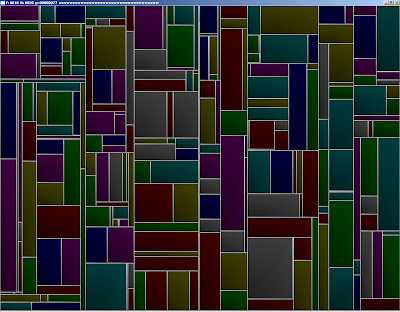


As far as I understand it, "KDTrees" are simply a data structure that says:

def kdtree:
def node:
x,y,w,h
split
low_node *
high_node *
parent *
direction

And, each node occupies a region of space defined by a x,y,w,h box (or x,y,z) and "splits" that box into TWO boxes, along only one of the axes (either x or y). This way, you can more efficiently partition static objects into a scene; this is like all BSP / octree scene management techniques; However, updating a KD tree is rather expensive, it really is good for storing static scenes though as it requires a far lesser node density and can expand into any other volume as needed.

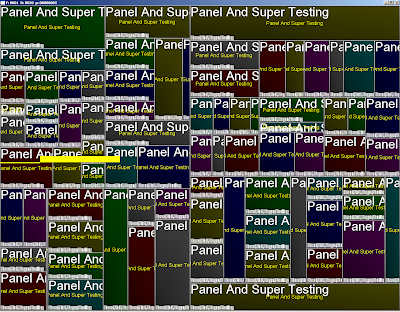
So, they're used in blender's GUI; I'm getting my mockup GUI system to work slowly, and here are many panels defined by glViewports with text in them. The text system is nothing more than a badass texture font I used some free program to generate with 2 px padding and as a alpha only texture, so the memory required for those letters is quite minimal; although fonts are not conducive to mipmapping, so you must manually provide other LOD fonts for your program. Don't forget that always mipmapping is better for your hardware.


I'm also perfecting my cMesh class, which will provide a full next generation mesh including armature animation and animux system, basically equaling and exceeding the capabilities of all existing high definition games; And doing so in a manner consistent with next gen technology (VBO/Shader) while still retaining the ability to be processed via older cards, at great CPU expense.

It looks something like this:
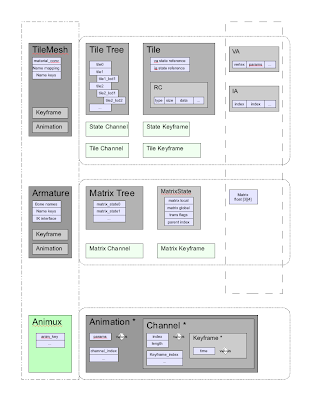


The concept is present in all games I have hacked, and works like this:

A mesh consists of "tiles", which are separate VA/IA's that contain some amount of triangle strips/triangles/quadstrips with a consistent vertex format and ideally contiguous data. This means each tile can store different vertex parameters, the usual culprits are:

current vertex position (3)
next vertex position + weight (4) //For mesh keyframes only
texcoord 0 (2) //1st texture coordinate
texcoord 1 (2) //2nd texture coordinate (if you have seperate UV mappings, not efficient)
normal (3) //Required for any lighting
binormal (3) //can be shader generated, but space may need to exist in VA array)
matrix indicies (4) //Required to skin a mesh that has more than 1 matrix deforming it
matrix weights (4) //Required to skin a mesh properly

So, each tile can behave as a independent mesh. Above a tile is a tile state, which contains the RC (RenderCommand) array for actually issuing the stripping indicies and material changes and matrix palette updates for this mesh.

Above that is the TileTree, so you can swap/zsort/prioritize and use lod tiles as needed.

the concept of a tile is to load all mesh data into your graphic card, and then merely tell the card what to use to render via a few array binding commands. This is extremely efficient, as it supports mesh instancing to a large degree, and prevents transferring data to the card. The only drawback is you still have to transmit matrix updates to the card, but even a 270 bone character (like Valgirt) this is still far less information that a small VA.

So, once you have tiles setup, we have a generic bone/matrix animation system, with a matrix class (yes, I like quat's too, but matrices require less conversions in a game setting; these matricies can be changed to be only state driven mind you.).

The heart of this system is the base animation classes, which consist of "Keys" which are blocks of static data to interpolate between, "Channels" which are a list of keys and times, and "Animations" which combine channels together to form complete animations.

The Animux is a animation multiplexer, which combines any number of animations together, so that you can use multiple types of animations together, for instance "Run_legs" and "Shoot_Torso" like Quake, or "Face_Phoneme_ma" and "Run". This allows you to make characters that can walk, talk, and run + shoot at the same time, and even use IK calculations as you want.

I've probably done this thrice before, but THIS time, I've got it nailed, and have massive amounts of evidence and experience with the new GLSL to support this type of design. Hopefully, I can get AniStar up and running so I can actually have a program that can make animations for given characters.

Z out.