xcore / mingl is moving along quite well.
Operating on a basic create / destroy paradigm, with bind/unbind as the activation mechanism and load as the data send mechanism, it works well for abstracting graphics hardware and allowing for faster creation of intense graphics applications.
Here's a nonsense screenshot:
This is a vector field represented as moving transparent spheres that are depth sorted. The vector field is generated by 3 functions modulated together.
The shading is generated via vertex and fragment program. The meshes are using a VBO/IBO abstraction paradigm.
All is well. More later.
Miscellaneous banter, Useful mathematics, game programming tools and the occasional kink or two.
Showing posts with label fragment program. Show all posts
2009-11-17
2009-03-24
More nonsense
So, working on more things, lots of things. 'Sys' is the new IGTL system namespace, which provides all the utilities that you could need for memory, data structures, file/directory IO, mathematics, 3D mathematics, algorithms, and all the basic stuf every system should have. Basically, it's a new version of cstdlib, that uses C++ stuff (like STL, but not junky) for some systems. Specially, it has a lot of very common math and algorithms in a very clean and not junky C-style system, so you don't have to freak out over overhead.
It's coming along awesome, and I love it. It makes so much more sense now, getting the base code out of the way. Although, it does prove that the C++ crap is near useless, which by extenstion makes most all languages that are not python a$$. And all other languages are useless for realtime stuff.
So, I also learned how to do 'Hemispherical Lighting', which is a simple little trick in your good ole shader math:
float dp = light_vector dot normal ;
float schemi = hemi_scale * pow( hemi_power, 0.5 * dp + 0.5 ); //Light factor to use
And, again in GL_fragment_shader_arb lingo,
DP3 temp2.x, nNorm, -mvp[2]; #Dot view normal (curr view) with vertex normal to get generic light intensity
#---Hemispherical lighting--- Req: K.y = 0.5, LK.z = light_pow, LK.w = light_scale
MAD temp2.y, temp2.x, LP.x, LP.y; #t = t*0.5 + 0.5 (hemispherical lighting = cool)
#---Scale the light to be the hemisphere
POW temp2.y, LP.z, temp2.y; #t = pow(t, hard), flip this to halo (A^B)
MUL temp2.y, temp2.y, LP.w; #t *= spec
#---Calculate final hemi diffuse color
MUL temp1, temp2.y, fragment.color; #Interpolate color to black (mult op)
And, some examples, but I don;t have comparison shots because Blender uses hemi lights, you can easily see the difference.
Hey, it's delgadosaur again, and it looks less plastic, more daylight plastic.
And a new member of the crew, this purple-dragon thing that's more friendly and low poly. But that's what textures and sub-surface models are for, right?
Anyways. Peace out.
-Z
It's coming along awesome, and I love it. It makes so much more sense now, getting the base code out of the way. Although, it does prove that the C++ crap is near useless, which by extenstion makes most all languages that are not python a$$. And all other languages are useless for realtime stuff.
So, I also learned how to do 'Hemispherical Lighting', which is a simple little trick in your good ole shader math:
float dp = light_vector dot normal ;
float schemi = hemi_scale * pow( hemi_power, 0.5 * dp + 0.5 ); //Light factor to use
And, again in GL_fragment_shader_arb lingo,
DP3 temp2.x, nNorm, -mvp[2]; #Dot view normal (curr view) with vertex normal to get generic light intensity
#---Hemispherical lighting--- Req: K.y = 0.5, LK.z = light_pow, LK.w = light_scale
MAD temp2.y, temp2.x, LP.x, LP.y; #t = t*0.5 + 0.5 (hemispherical lighting = cool)
#---Scale the light to be the hemisphere
POW temp2.y, LP.z, temp2.y; #t = pow(t, hard), flip this to halo (A^B)
MUL temp2.y, temp2.y, LP.w; #t *= spec
#---Calculate final hemi diffuse color
MUL temp1, temp2.y, fragment.color; #Interpolate color to black (mult op)
And, some examples, but I don;t have comparison shots because Blender uses hemi lights, you can easily see the difference.
Hey, it's delgadosaur again, and it looks less plastic, more daylight plastic.
And a new member of the crew, this purple-dragon thing that's more friendly and low poly. But that's what textures and sub-surface models are for, right?Anyways. Peace out.
-Z
Labels:
dragon,
fragment program,
GLSL,
lizard,
opengl,
SDL,
vertex program
2009-02-10
Thumbs Up!
Okay, I got it. Matrix Palette exporter works fine now.

Next up is adding in textures in MIF/QIF format (already done, copy paste job), and then deciding the structure for spread-optimized armature/matrix palette, and then keyframes using vertex duplicate's.
Of course, now that THIS works, it'll be time to shove it onto the iPhone. Imagine that, "Monster Game" for the iPhone! Course it'll be stripped down, but hey, sounds fun.
Peace ya'll!
-Z
Next up is adding in textures in MIF/QIF format (already done, copy paste job), and then deciding the structure for spread-optimized armature/matrix palette, and then keyframes using vertex duplicate's.
Of course, now that THIS works, it'll be time to shove it onto the iPhone. Imagine that, "Monster Game" for the iPhone! Course it'll be stripped down, but hey, sounds fun.
Peace ya'll!
-Z
Labels:
ARF,
BRF,
fragment program,
lizard,
opengl,
SDL,
shaders,
vertex program
2009-02-07
Well, goddamnit, GODDAMNIT! Again, again!
Well, still can't get it right. The materials have been fixed, apparently, but only for some models. Others still have trouble??? (Saurosaur model has some trouble when it's subsurfaced, but I believe this is related to the matrix problem at hand)
At least this picture is a little less boring

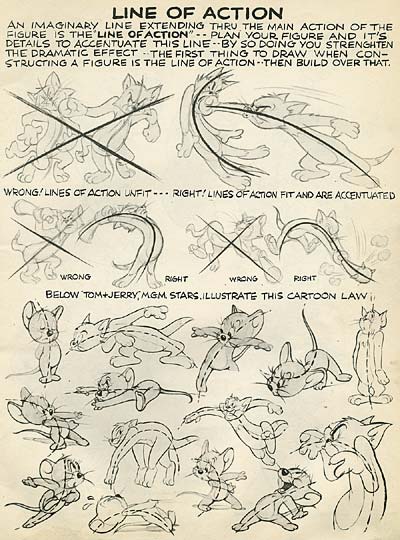
Also, I have a feeling some people don't know what spinal curves are. Actually, if you have studied animation, you might understand these as "Action Lines" or "Line of Action" or whatever name you want to give them. In fact, if you build your skeleton correctly, you can draw these spinal curves, and it shows you the model's action pose, from which it is WAY easier to tweak that action line than it is to screw with posing bones. I hope that Blender integrates this posing system into it's bones, it would only require an additional flag and some simple bone-blending editing tricks. It's very helpful for bringing things to life. What good is this realtime though? It's helpful if you don't have shaders on your PC, so you can at least see the game sort of. It's also helpful for special effects, and some other 'interesting' deformations... he he.

I still need help with the exporter. It's not to my QC standards yet.
-Z
At least this picture is a little less boring

Also, I have a feeling some people don't know what spinal curves are. Actually, if you have studied animation, you might understand these as "Action Lines" or "Line of Action" or whatever name you want to give them. In fact, if you build your skeleton correctly, you can draw these spinal curves, and it shows you the model's action pose, from which it is WAY easier to tweak that action line than it is to screw with posing bones. I hope that Blender integrates this posing system into it's bones, it would only require an additional flag and some simple bone-blending editing tricks. It's very helpful for bringing things to life. What good is this realtime though? It's helpful if you don't have shaders on your PC, so you can at least see the game sort of. It's also helpful for special effects, and some other 'interesting' deformations... he he.

I still need help with the exporter. It's not to my QC standards yet.
-Z
Labels:
blender,
BRF,
fragment program,
lizard,
opengl,
SDL,
vertex program
2009-02-04
Well, goddamnit again!
Still fighting. Hang in there, plastic lizard monster!
And yes, you will be fighting against this mo'fo, but as you can see, there are still glitches in the code. I am still lost as to where, it seems that larger models export better (how crazy is that?!) and they work fantastically well, as you can see.
What is wrong:
Materials are not perfect, there are 1 spots on this model that have incorrect materials
Not all deformation groups are correct, you can see the spike present. On lower res models, it's way uglier.
I need help.
-Z
And yes, you will be fighting against this mo'fo, but as you can see, there are still glitches in the code. I am still lost as to where, it seems that larger models export better (how crazy is that?!) and they work fantastically well, as you can see.What is wrong:
Materials are not perfect, there are 1 spots on this model that have incorrect materials
Not all deformation groups are correct, you can see the spike present. On lower res models, it's way uglier.
I need help.
-Z
Labels:
fragment program,
lizard,
opengl,
SDL,
vertex program
2009-02-03
Well, goddamnit!
Well. I still am having a hell of a time getting my GRF exporter to cooperate.
For some reason, it works fine for models with less than 24 bones. However, models that have more than that (all of mine do) it screws up something with the vertex data, or maybe the bones, because suddenly, and irrationally, the bone groups dissociate and the neck will move when you bend the tail.
I'm at a loss here, as I've checked the algorithms a hundred times, checked and verified the DATA ITSELF, so that I know that the bones are correct, faces, everything is correct... checked the C++ code, which reads it EXACTLY as the file, so I know the C code works since it is general case... so, where is the error?
My guess is it lies inside of python somewhere.
Maybe a stupid screenshot will cheer me up:
Whoopee... old school poser models. yay.
Also, I have the fragment program and vertex program working fine. Tested, verified, fun to play with and easy to work with. I'll be much happier when I can GLSL this mess, although these programs are just about as fast as it can get, so not much reason to yet.
Blender is cooperating fine, I've had no problems from it, aside from this list of annoyances:
1. No bone weight keyframes available, I need to be able to save weights in vertex groups as a keyframe
2. No UV keyframes available, I need to be able to save UV layer keyframes
3. Actions are not tied to anything, and they are still difficult to use for making a movie, most people just use the 'one large action' to do it. Make actions work like actions, not scene animations. Make the NLA mean something, dammit.
4. No support for mesh keyframe animations that makes sense. Why can't I just IPO a list of keyframes, instead of making 1 ipo for each keyframe (which is hell without a script, by the way)
5. More materials. I need more than 16 materials. try 127? or 255?
6. Much improved curve support. I should be able to hook curve verticies ONTO anything, like armatures and objects and verticies, without having to use the vertex hook <-> empty <-> curve thing.
and so on.
Hopefully I can get this $@#*( problem solved. This isn't a specialized problem, it's general, so it works for any matrix-palette system, including the coveted iPhone, PS3, and the PC.
Peace folks,
-Z
For some reason, it works fine for models with less than 24 bones. However, models that have more than that (all of mine do) it screws up something with the vertex data, or maybe the bones, because suddenly, and irrationally, the bone groups dissociate and the neck will move when you bend the tail.
I'm at a loss here, as I've checked the algorithms a hundred times, checked and verified the DATA ITSELF, so that I know that the bones are correct, faces, everything is correct... checked the C++ code, which reads it EXACTLY as the file, so I know the C code works since it is general case... so, where is the error?
My guess is it lies inside of python somewhere.
Maybe a stupid screenshot will cheer me up:
Whoopee... old school poser models. yay.Also, I have the fragment program and vertex program working fine. Tested, verified, fun to play with and easy to work with. I'll be much happier when I can GLSL this mess, although these programs are just about as fast as it can get, so not much reason to yet.
Blender is cooperating fine, I've had no problems from it, aside from this list of annoyances:
1. No bone weight keyframes available, I need to be able to save weights in vertex groups as a keyframe
2. No UV keyframes available, I need to be able to save UV layer keyframes
3. Actions are not tied to anything, and they are still difficult to use for making a movie, most people just use the 'one large action' to do it. Make actions work like actions, not scene animations. Make the NLA mean something, dammit.
4. No support for mesh keyframe animations that makes sense. Why can't I just IPO a list of keyframes, instead of making 1 ipo for each keyframe (which is hell without a script, by the way)
5. More materials. I need more than 16 materials. try 127? or 255?
6. Much improved curve support. I should be able to hook curve verticies ONTO anything, like armatures and objects and verticies, without having to use the vertex hook <-> empty <-> curve thing.
and so on.
Hopefully I can get this $@#*( problem solved. This isn't a specialized problem, it's general, so it works for any matrix-palette system, including the coveted iPhone, PS3, and the PC.
Peace folks,
-Z
Labels:
blender,
dragon,
fragment program,
opengl,
SDL,
vertex program
Subscribe to:
Posts (Atom)